



Most Amazon FBA sellers have the same blind spot.
They spend months researching the right product. They source it carefully, get it into FBA, launch with PPC, and then watch sales plateau at a number that should be higher. So they pour more money into ads. The number barely moves.
The product is usually fine. The ads are usually not the problem.
Many sellers assume traffic is the issue when, in reality, their listing isn’t converting visitors into buyers. The problem is twelve specific gaps that quietly bleed revenue every single day, while the seller assumes the issue is budget.
Amazon’s average conversion rate sits between 10 and 15 percent, roughly 7 to 10 times higher than a typical e-commerce website. The sellers hitting that top end are not smarter. They have simply closed these gaps while everyone else keeps running the same Sponsored Products campaign and wondering why nothing changes.
Let us go through every single one.

Bucket 1: On-Page Visual and Listing Mistakes
These are the gaps that cost you clicks and conversions before a single ad dollar is spent.
1. Your Images Are Basic and Generic
Walk through ten Amazon listings in your category right now. Most of them look identical. White background main image. Three flat product shots. Maybe a generic graphic. Done.
That approach worked in 2019. In 2026, it is leaving significant money on the table.
Static images are often not enough. Adding video to your Amazon listing keeps potential buyers on your page longer, and boosting engagement is one of the most impactful ways to optimise a listing. A buyer who watches a 30-second product demonstration before purchasing has already answered their own objections visually. A buyer who only sees a white-background image still has questions. And buyers with unanswered questions do not buy.
What to fix:
- Add a product video to your listing carousel. It does not need to be a production. A clean 45 to 60 second demonstration filmed properly on a decent phone consistently outperforms no video.
- Use all available image slots. Amazon allows up to nine images. Most sellers use four or five. Every unused slot is an unanswered question.

Your Listing Is Incomplete
Incomplete listing optimisation is not just missing a few keywords. It covers several compounding gaps:
The single highest-impact optimisation change in real account data is replacing spec-only bullet points with benefit-led copy. This change alone drove an average 1.8 percentage point conversion rate improvement per ASIN.
“Contains 500mg of magnesium” does not sell. “Helps you fall asleep faster without the groggy morning feeling” does. The buyer knows what is in the product. They want to know what it does for them.
2. The four most common incomplete listing gaps:
| Gap | Why It Hurts |
| No A+ Content | Loses the most persuasive section of your listing to a plain text block |
| Spec-only bullet points | Buyers skim benefits, not features |
| Backend keywords incomplete | You cannot rank for keywords you are not indexed for |
| Missing image slots | Unanswered visual objections = unconverted traffic |
Relevance comes from the structured fields: title, brand, bullets, description, and category. Conversion comes from images, price, reviews, A+ Content, and trust signals. Optimise for all three and ranking compounds. Optimise for just one and you stall.
3. You Are Not Optimising for Mobile
This one is where most sellers are most behind.
Mobile accounts for 49.2 percent of all Prime Day purchases. In account audits through 2025 and 2026, 60 to 70 percent of listing views in most categories came from mobile, while 80 to 90 percent of the creative was designed for a desktop screen.
That mismatch shows up directly in the conversion rate. Here is what it means in practice:
Title: Amazon truncates your title at around 60 to 80 characters on mobile. If your brand name and model number sit at the front and your actual product benefit is buried at character 90, mobile shoppers never see the thing that would make them click.
Infographic images: If the text in your lifestyle graphics requires pinching and zooming to read on a phone, it will not be read. One benefit per graphic. Large text. High contrast.
The fix is simple: design every image and title for a five-inch screen first. Check the desktop second. Right now, most sellers do it the other way around.
Bucket 2: Traffic, Promotion, and Advertising Traps
These are the revenue gaps that sit in your ad account and your promotional settings.
4. You Are Only Running Sponsored Products
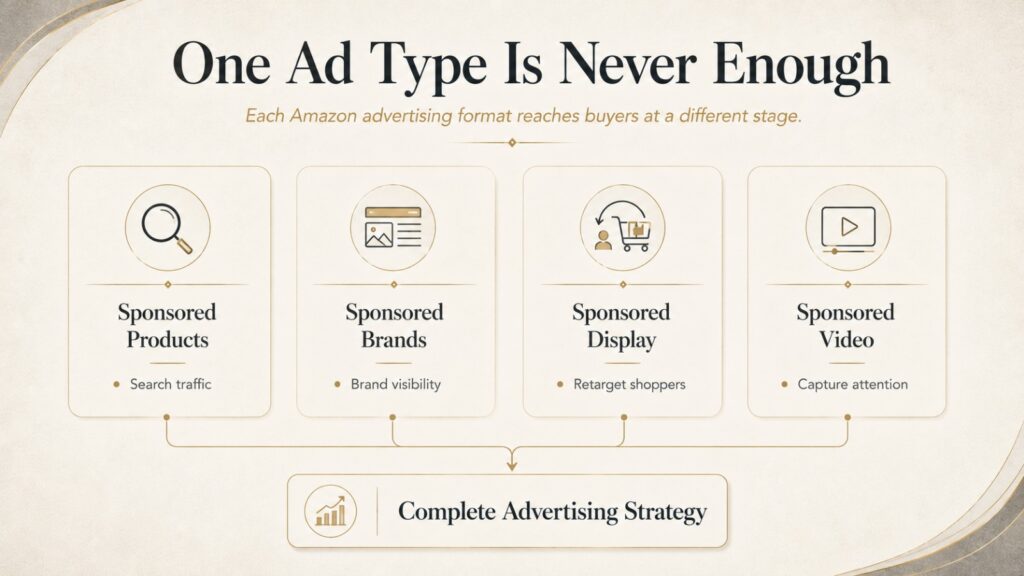
Sponsored Products is where most FBA sellers start and where most FBA sellers stop. This means you are competing in one lane on a road that has four.
| Ad Type | What It Does | Why Most Sellers Skip It |
| Sponsored Products | Drives traffic directly to your listing | Everyone runs these |
| Sponsored Brands | Shows your brand logo, headline, and multiple products at the top of search results | Requires Brand Registry; many sellers skip setup |
| Sponsored Display | Retargets shoppers who viewed your listing but did not buy | Sellers assume it is complex |
| Sponsored Video | Autoplay video in search results, highest CTR format | Sellers do not have a video ready |
Each ad type reaches buyers at a different stage. Sponsored Products captures buyers already searching for your product. Sponsored Brands captures buyers comparing brands. Sponsored Display recaptures buyers who almost purchased. Sponsored Video captures attention before intent is formed.
Running only Sponsored Products means you are invisible to everyone except the buyer, who is already halfway to purchasing anyway.
5. You Are Not Using Promotional Triggers
Three types of promotions visibly change how your listing looks in search results before anyone clicks through:
- Coupon badge: appears on your thumbnail image in search results and increases click-through rate
- Lightning Deals: countdown urgency that drives immediate purchase decisions
- Prime Exclusive Discounts: visible only to Prime members, who represent Amazon’s highest-converting buyer segment
These are not just discounts. They are visual conversion tools that work at the search results level, before the buyer even reaches your listing.
Sellers who consistently run promotions do not just benefit from the discount effect. They benefit from higher click-through rates, which signal relevance to Amazon’s algorithm, which improves organic ranking. The promotional trigger and the ranking benefit compound together.
6. You Are Relying Only on Internal Amazon Traffic
Treating Amazon’s internal traffic as your only source of buyers is one of the most common growth ceilings FBA sellers hit. And there is a specific financial incentive to drive external traffic that most sellers do not know about.
Amazon’s Brand Referral Bonus program pays sellers back approximately 10 percent of the sale price as a credit against referral fees when a buyer comes from an external source through an Amazon Attribution link. That is a 10 percent reduction in Amazon fees on every external-traffic-driven sale. (Source: SellerSprite Amazon Conversion Rate Benchmarks 2026)
Beyond the financial bonus, driving external traffic from TikTok, Meta Ads, or Google also boosts your organic ranking on Amazon. Sales velocity from any source signals to Amazon’s algorithm that your product deserves better placement. Brands driving external traffic consistently see organic keyword rankings improve even when nothing inside their Amazon campaigns changes.
Found a Few of These Gaps in Your Store?
Most Amazon sellers don’t have one major problem; they have several small ones that quietly reduce conversions, increase ACoS, and limit organic growth. The good news is that most of these issues can be identified with a structured audit.
Book a free Amazon store consultation with Crew27, and our specialists will review your listings, advertising, and Seller Central setup to identify the biggest opportunities for improvement.

Bucket 3: Backend, Retention, and Operations Leaks
These are the quiet revenue losses sitting in your Seller Central settings right now.
7. Subscribe and Save Is Turned Off
If your product has any natural repurchase cycle, a supplement, a cleaning product, a coffee, a skincare item, or a pet supply, Subscribe, and Save is one of the clearest repeat revenue tools on Amazon. And it is consistently the most ignored.
Here is the logic simply. A customer who subscribes does not make an active purchase decision next month. Their order arrives automatically. They are not browsing your category again. They are not seeing the new competitor that launched last week. They are not reading the reviews on the alternative that now has 200 more ratings than yours.
Without Subscribe and Save, every reorder is a fresh decision. And fresh decisions are fresh opportunities for a competitor to win the next sale. If your product has a natural reorder cycle and Subscribe and Save is not enabled, you are actively gifting repeat customers to competitors.
8. Your Brand Store Is Treated Like a Static Page
Here is what happens without a properly built Brand Store. A buyer likes your product enough to click on your brand name in the listing. Amazon takes them to a generic search results page full of competitor products. You paid for the traffic that just sent a warm buyer directly to the competition.
With a properly built Brand Store, clicking your brand name opens a curated, branded experience showing your full catalogue, your brand story, and products the buyer may not have otherwise discovered.
Beyond that, Brand Registry unlocks:
- A+ Content on every listing
- Sponsored Brand and Sponsored Video ads
- The Request a Review button (critical for review generation)
- Virtual Bundles (covered next)
- Brand Analytics access
- Listing hijacker protection
Without Brand Registry, you are missing half the tools Amazon gives brands to compete properly.
As your catalog grows, many brands eventually reach a point where managing listings, PPC, reviews, and inventory internally becomes difficult. That’s when they start comparing Amazon Virtual Assistants vs Amazon Automation Services to determine the right long-term support model.
9. You Are Not Using Virtual Bundles
This one is specifically for sellers with multiple products, and it represents an easy cross-selling win that most of them are not using.
Amazon’s Virtual Bundles tool lets you create bundle listings from 2 to 5 existing FBA products without any additional inventory or packaging changes. A customer buying a yoga mat sees a bundle with your yoga mat, resistance bands, and a carrying strap on the same listing. No new SKU. No new shipment. Just a bundle listing you built in Seller Central.
The reason this matters beyond the obvious revenue upside is what happens when you do not build them. Amazon fills the “Frequently Bought Together” section on your listing with whatever it thinks fits. If you have not specified this through a virtual bundle, Amazon will often surface a competitor’s product in that section.
You are already paying for the traffic landing on your page. You might as well control what those buyers see when they are ready to add something else to their cart.
10. You Are Passive About Reviews
Reviews are not just social proof. On Amazon, they directly affect click-through rate, conversion rate, and organic ranking. A product with 4.8 stars and 300 reviews outperforms an identical product at 4.2 stars and 50 reviews in almost every comparison, all else being equal.
Two specific areas where most sellers leave review momentum on the table:
The Request a Review button. Amazon’s compliance-friendly review request tool sends an Amazon-branded email asking for a review. It sits inside Seller Central. Most sellers either do not know it exists or use it inconsistently. Every fulfilled order without this sent is a review you could have had.
Responding to negative reviews. Brand Registry sellers can contact buyers who left 1 to 3-star reviews through Amazon’s messaging system to resolve the issue. A resolved issue regularly results in an updated or removed review. Leaving negative reviews unaddressed is letting your listing rating slowly decline with zero effort to recover it.
11. Running Out of Stock
This one is not complicated, but the damage it causes is consistently underestimated.
When you go out of stock as an FBA seller, Amazon drops your organic keyword rankings. Not temporarily. They fall, and rebuilding them after inventory returns requires aggressive PPC spend over weeks or months to claw back to where you were before.
The sellers who maintain stable keyword rankings over time are not always the ones with the best listings. They are often the ones with the most consistent inventory. Supply chain management is a competitive advantage on Amazon, and treating it as a purely logistical concern rather than a core ranking factor is expensive. As stores grow, keeping listings updated, monitoring inventory, and managing catalog changes becomes increasingly difficult for a single seller. This is one reason many brands outsource repetitive operational work before it starts affecting rankings.
Forecast your demand properly. Build buffer stock on your top SKUs before peak periods. And treat going out of stock as the ranking and revenue event it is, not just an inventory inconvenience.
12. Ignoring Your Customer Questions and Answers Section
The Q and A section on your listing is the most overlooked part of an Amazon product page and one of the most important for buyers, right on the edge of deciding whether to purchase.
A buyer who has read your title, checked your images, scanned your bullets, and read a few reviews is close to buying. Then they have one specific question. “Is this dishwasher safe?” “Will this fit the iPhone 16?” “How long does one bag last if you use a scoop per day?”
If the answer is not in your Q and A section, that buyer goes to a competitor’s listing. Or they simply buy from the seller who already has that answer visible.
Amazon allows sellers to answer questions on their own listings. Most do not. Proactively seeding your Q and A section with the five to ten most common pre-purchase questions, answered clearly and helpfully, turns one of the most ignored sections of your listing into a conversion tool.

The 12-Point Quick Audit
Before anything else, run through this. It takes less than 30 minutes and will show you exactly where your biggest gaps are right now.
| Area | What to Check |
| Images | Product video in carousel? All 9 image slots used? |
| Listing copy | Benefits-led bullets? A+ Content live? |
| Mobile | Title benefit visible in first 70 characters? Images readable at thumbnail size? |
| PPC | Running Sponsored Brands, Display, and Video alongside SP? |
| Promotions | Active coupon, deal, or Prime discount running? |
| External traffic | Amazon Attribution links set up for off-Amazon traffic? |
| Subscribe and Save | Enabled for all repurchase-cycle products? |
| Brand Store | Built out with full catalogue and brand story? Brand Registry enrolled? |
| Virtual Bundles | Complementary product bundles created? |
| Reviews | Request a Review button used on recent orders? Negative reviews addressed? |
| Inventory | Buffer stock on top SKUs? Demand properly forecasted? |
| Q and A | Common pre-purchase questions answered? Section monitored weekly? |
If you have more than four or five negatives here, you have found exactly where the 30 percent is going.
These Are Fixable. But Someone Has to Actually Fix Them.
Reading this list and knowing what needs to happen is the easy part. The harder part is doing all of it continuously, not as a one-time audit.
A+ Content needs building and updating when your positioning shifts. Videos need to be created. Mobile images need redesigning when new competitors enter. Virtual Bundles need building across a growing catalogue. The Request a Review flow needs to be checked every week. The Q and A section needs monitoring and answering. Sponsored Display, Sponsored Brands, and Sponsored Video campaigns need daily attention alongside your Sponsored Products.
These are not one-time tasks. They are ongoing functions that need someone actively looking after them every week.
This is exactly what a trained Amazon VA handles. Not a general assistant who needs to be taught what A+ Content is. A specialist who already works inside Seller Central daily and knows why each of these gaps exist and how to close them properly.
If you want to understand how to set up the right delegation structure for your Amazon operations, this guide on how to train a VA to run your store without you covers the exact handoff process from SOP building to full independent operation.
Ready to close these gaps without doing all of it yourself?
Our Amazon VA team handles daily listing management, PPC monitoring, review generation, Brand Store updates, Q and A monitoring, and everything else covered in this guide as their specific job.
Book a free consultation with Crew27, and we will audit your listing against these 12 points and show you exactly where your biggest opportunity is right now.
Why are my Amazon FBA sales suddenly dropping?
The most common causes are a drop in organic keyword ranking (often triggered by going out of stock or a conversion rate decline), increased competition in your category, listing changes that hurt click-through or conversion, or an ad campaign issue. Start by checking your Unit Session Percentage in Business Reports to see whether fewer visitors are converting, then check your keyword rankings and inventory levels. If your conversion rate has dropped, the listing is usually the cause. If your rank has dropped, inventory history or PPC changes are usually the reason.
How much does Amazon listing optimisation actually affect sales?
Significantly. A full listing refresh covering title, bullets, A+ Content, and backend keywords produced a median 4.2 percentage point conversion rate improvement across 90 days of real account data. On a listing receiving 1,000 sessions per month, a 4 percent conversion rate improvement means 40 additional orders monthly without any increase in ad spend. At a $30 average order value, that is $1,200 in additional monthly revenue from listing changes alone.
Does driving external traffic to Amazon actually help organic rankings?
Yes. Amazon’s algorithm rewards sales velocity from any source. When external traffic from TikTok, Meta Ads, or Google converts on your Amazon listing, it sends the same ranking signal as an organic sale. Sellers who drive consistent external traffic regularly see organic keyword rankings improve alongside the direct revenue from those sales. The Brand Referral Bonus program also credits sellers approximately 10 percent of the sale price when external traffic converts through an Amazon Attribution link, effectively reducing your referral fee on those orders.
What is the Amazon Brand Referral Bonus, and how do I get it?
The Brand Referral Bonus is a program where Amazon pays you back around 10 percent of the sale value as a referral fee credit when you drive external buyers to your Amazon listing through Amazon Attribution tracking links. You set up an Attribution link for each external traffic source, share that link in your TikTok videos, Meta ads, or Google campaigns, and Amazon tracks the resulting sales. The bonus accumulates as credits against future referral fees. Brand Registry enrollment is required to access Attribution links.
Why should I use Virtual Bundles if my products already sell individually?
Two reasons. First, bundles increase average order value without requiring new inventory or physical packaging since Amazon pulls from your existing FBA stock. Second, and more importantly, if you do not create your own bundles, Amazon may populate the “Frequently Bought Together” section on your listing with a competitor’s product instead. Building your own Virtual Bundles lets you control what buyers see when they are ready to add something to their cart. Bundles can also rank for additional keyword combinations that individual listings do not capture, bringing in traffic you would not otherwise see.